Fablesh Studio · The Fablesh DAW
Make the whole song.
Fablesh Studio is a DAW, a recording studio as a program, that takes a song all the way: record, play instruments, arrange, mix and master, then send the finished track to Fablesh, where it becomes a release and goes on the radio. It runs in your browser, and as an app for macOS and Linux.
Comes fromImages — artwork for the releaseContinues inVideo — the song becomes a film
What it does
Every step of the song, in one program.
Instruments
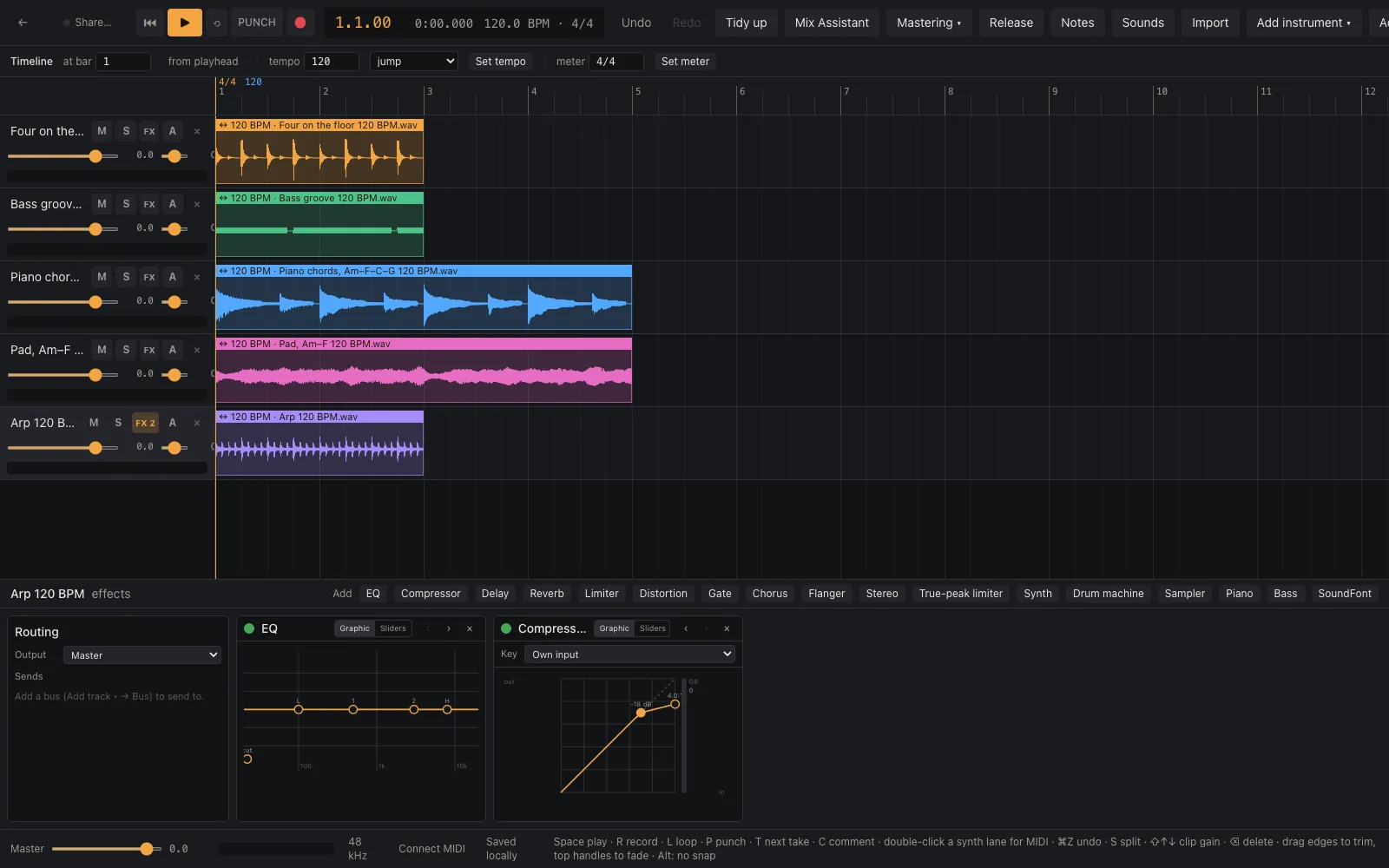
A synth, a drum machine, a sampler, a piano, a bass, two guitars and a SoundFont player, and a recorded grand piano and drum kit that download the first time you add them. Play them from a MIDI keyboard, or draw notes in the piano roll, along with how hard each one is played and how the controls move.
Included with an account. No credits are spent and no card is needed.
OpenEffects you can see
EQ, compressor, delay, reverb, limiter, true-peak limiter, distortion, gate, chorus, flanger and stereo tools. Each has an easy-to-use graphical view — drag the curve — and its sliders and faders are only one click away.
Included with an account. No credits are spent and no card is needed.
OpenRecord and arrange
Record from your audio interface, loop and punch in, and keep every take. Bring in WAV, FLAC, MP3, AIFF and more, or begin with 27 starter sounds created in Fablesh Studio.
Included with an account. No credits are spent and no card is needed.
OpenA timeline that follows the music
Tempo, meter, key and chords can change as often as the song does. Analyse a clip to hear its tempo, beats, key, chords and sections, and make use of whatever fits best.
Included with an account. No credits are spent and no card is needed.
OpenMix Assistant
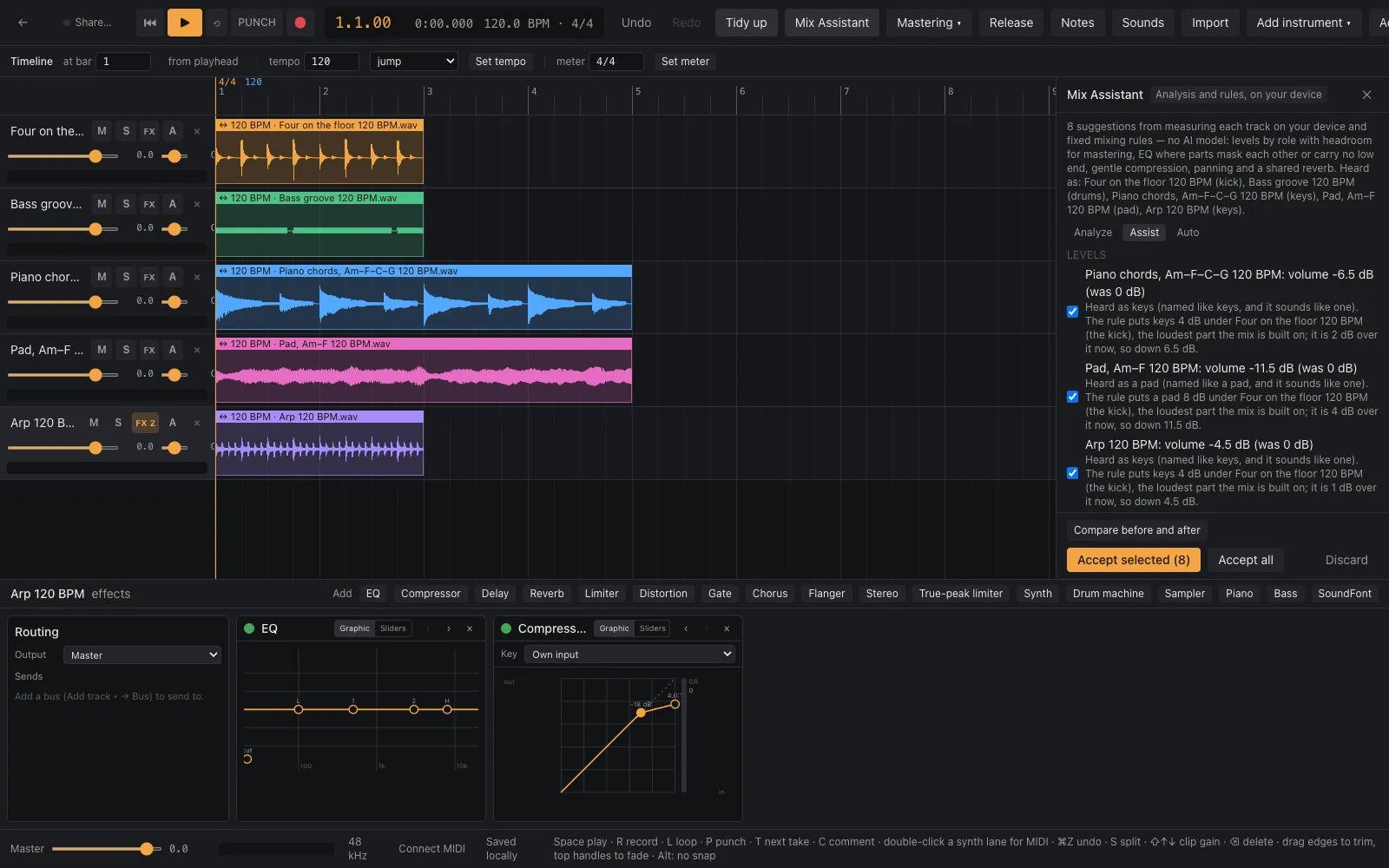
Receive a balanced first mix as a list of suggestions, each with an explanation. It is not AI: it measures your tracks and applies fixed mixing rules on your own device. Compare the mix before and after, and accept only the changes you want.
Included with an account. No credits are spent and no card is needed.
OpenMastering to a target
A master chain that brings the mix to one of five loudness targets, among them Streaming (−14 LUFS), Club / CD (−9), Podcast (−16) and Broadcast (−23). The export shows the loudness the file actually measures.
Included with an account. No credits are spent and no card is needed.
OpenExport, MIDI and DAWproject
Export the mix as a 24-bit WAV, stems as WAVs in a ZIP, and MIDI as a Standard MIDI File. Fablesh Studio imports MIDI files too, and opens and saves whole projects in the open DAWproject format.
Comes with any monthly plan, from $2.99 a month. Not part of Starter.
OpenReview links
Share a named version — “Mix 3” — as a link. Listeners can comment on any moment in the song without a Fablesh account, and their comments appear on your timeline.
Comes with any monthly plan; Starter runs Studio in demo mode.
OpenWork together
Share a project with your Fablesh contacts as editors or viewers. See each other's playhead and selection as you work; edits made offline merge when you reconnect.
Comes with any monthly plan; Starter runs Studio in demo mode.
OpenThe Fablesh artist library
Loops, one-shots and kits created by artists on Fablesh, with the licence and credit cited for every sound. Use one and the credit travels with your release. Publish your own from a clip.
Comes with any monthly plan; Starter runs Studio in demo mode.
OpenRelease to Fablesh
Prepare for distribution masters the track to its target, checks title, credits, artwork, ISRC, rights and AI disclosure, and sends it to Fablesh as a draft in your works.
Comes with any monthly plan; Starter runs Studio in demo mode.
OpenPlugins and stems, on your computer
The desktop app hosts the plugins installed on your computer (CLAP, VST3, and Audio Units on a Mac), and separates a recording into drums, bass and other with Fablesh's own model.
In the desktop app for macOS and Linux.
OpenThe Studio
Real screens.
Desktop app
Fablesh Studio on your computer.
Get the Fablesh Studio app for macOS and Linux. It does everything the browser version does, and adds your audio interface, your plugins and stem separation. It tells you when a new version is out and installs it when you say so.
Download for macOS0.3.11 · about 40 MB · macOS 10.15 or later · one download for every Mac
0.3.11 · .deb about 25 MB · AppImage about 102 MB · x86-64 · Debian 12, Ubuntu 22.04 and newer · the AppImage installs a new version itself, the .deb is updated by installing the new one
What the desktop app adds
- Sound made natively on your audio interface.
- The plugins installed on your computer: CLAP and VST3, and Audio Units on a Mac.
- Stem separation — drums, bass, other — with Fablesh's own model, downloaded the first time you use it (176 MB).
On a Mac, stem separation needs an M-series chip; on Linux it runs on any x86-64 computer. Windows is not currently available.
Fablesh Studio
From Studio to the radio.
Your release lands here
A track sent from Fablesh Studio arrives as a draft in your works. Publish it and it is in the catalogue and on three stations.
How the radio worksYour contacts are your band
Fablesh Studio shares projects with the people you are connected to on Fablesh, and invitations are accepted on fablesh.com.
Your peopleFeedback without a sign-up
Review links open on fablesh.com, so anyone you send one to can listen and comment without making an account.
How review links workSamples by artists here
The Fablesh library consists of work created by artists on Fablesh. The licence and credit are cited for every sound.
Meet the artistsQuestions
What people ask.
- What does it cost?
- Fablesh Studio has no licence fee. With a Starter account it runs in demo mode: you can record, play the instruments, mix and listen as much as you like. Exporting audio, sharing a project, review links, the artist library and releasing through Fablesh come with any monthly plan, from $2.99 a month. AI note suggestions in the piano roll and Generate music spend credits, and the price is shown before you use them.
- Do I need an account?
- Yes. Fablesh Studio opens with your Fablesh account connected, so every track created has a known maker — this is how Fablesh knows who made what. Creating an account only takes a minute and no card is required.
- Where are my projects saved?
- In your browser, on your own device. Nothing is uploaded unless you decide to share a project or release something on Fablesh. Save a .fstudio file to keep a copy or to move a project to another computer.
- Which browser do I need?
- A current desktop browser. Playing from a MIDI keyboard needs a browser with Web MIDI — Fablesh Studio tells you if yours has none. Everything else works without it.
- Is there a desktop app?
- Yes, for macOS 10.15 or later and for Linux (x86-64, as a .deb or an AppImage). It tells you when a new version is out and installs it when you say so. It adds sound made natively on your audio interface, the plugins installed on your computer (CLAP, VST3, and Audio Units on a Mac), and stem separation (drums, bass, other) with Fablesh's own model; on a Mac, stem separation needs an M-series chip. Windows is not currently available.
- Does Studio use AI?
- Mix Assistant, Mastering and the session players do not: they are measurements and fixed rules that run on your device, and Fablesh Studio labels them as rules. Two things do use AI, and both spend credits with the price shown first: note suggestions in the piano roll, and Generate music, which makes a part from your description with Fablesh AI. Nothing changes your project until you accept it, and anything AI or rules did to a track is listed in its release's AI disclosure.
- Can I take a project somewhere else?
- Yes. Export it in the open DAWproject format, or export the mix, the stems and the MIDI. Fablesh Studio's own instruments and effects only play in Studio, so export stems when collaborators need the sounds exactly as you used them.
- How does a track get from Studio onto the radio?
- Clicking Prepare for distribution sends the finished master to Fablesh as a draft in your works. Publish it there and it enters the catalogue and goes on Fablesh radio, like any other upload. For streaming stores, the release page has the DistroKid hand-off, showing the credits, ISRC request, rights and AI disclosure that came from Fablesh Studio.
Where this ends up
The catalogue, and then the air.
What you finish here goes into the catalogue, onto three stations and onto a page that is yours. That is what these tools are for — it is not a separate service you upload to afterwards.